Demo

New Feature: Multi-Company Access

Daylit now supports multi-company access, letting users seamlessly manage multiple organizations from a single account.

Jared Shulman
October 15, 2025

Great news! Daylit (formerly Lendica) now supports multi-company access, letting users seamlessly manage multiple organizations from a single account.

Molly Roche from our team walks you through how this new feature works:

What's new?

Easily join multiple companies on Daylit

Users who are already part of one company (say Company A) can now join another (Company B) without creating a new account.

Simple invitation flow

A team member from Company B can invite the user to join. The user receives an email invite, accepts it, logs in, and gains instant access to Company B’s Daylit dashboard.

Quick and seamless company switching

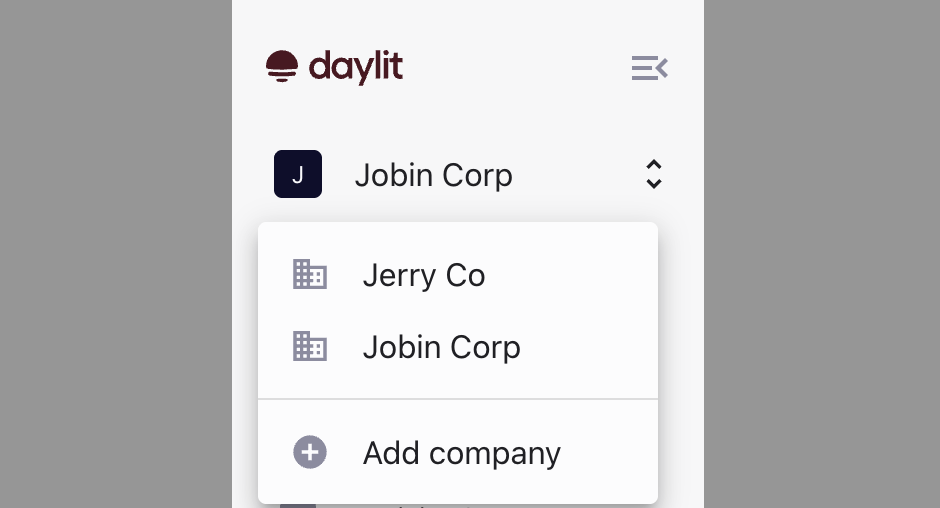
Once part of multiple organizations, users will see a company switcher on their dashboard. They can switch between companies (e.g., Company A ↔ Company B) with one click.

Add or join new companies

On the switcher, there’s now an “Add Company” option with two clear paths:

  • If the company is already on Daylit → ask a teammate to send an invite.
  • If it’s a new company → start a new Daylit application directly from this link.‍

‍

If you face any issues joining or switching companies, please reach out to your Daylit account rep.

Cheers,

The Daylit Team

‍

Insights

You might also like...

VP of finance reviewing a cash flow forecast at a conference table
Cash Flow Forecasting Software: What It Does and How to Evaluate Accuracy
What cash flow forecasting software actually does, and how to judge whether its accuracy claims hold up — including the MAPE metric vendors rarely volunteer.
Read more
Cash Flow Forecasting Software: What It Does and How to Evaluate Accuracy
Accounts Receivable Automation
AR manager on a headset call reviewing a dispute file
How to Build an Invoice Dispute Management Process That Doesn't Delay Cash Flow
How to build an invoice dispute management process with clear ownership, resolution steps, and the KPIs — like cycle time and resolution rate — that show whether it's working.
Read more
How to Build an Invoice Dispute Management Process That Doesn't Delay Cash Flow
Accounts Receivable Automation
AR manager reviewing an aging report at a standing desk
Days Sales Outstanding (DSO) Formula: How to Calculate It and Avoid Common Mistakes
The DSO formula explained with a worked example — plus the two mistakes (seasonality and confusing it with AR turnover) that most often distort the number.
Read more
Days Sales Outstanding (DSO) Formula: How to Calculate It and Avoid Common Mistakes
Accounts Receivable Automation
Invite your team members to Daylit.

Sign in to Daylit, head to Members (Team), and invite your first Admin today.

Button
Button