Accounts Receivable Automation

Why the Most Effective Collections Channel Gets Skipped First (And What to Do About It)

Most past-due invoices aren't stuck because someone's disputing them — they're stuck behind a phone call nobody had time to make. Daylit's agent now runs that call, so the channel that actually reaches people stops being the one your team skips.

Jared Shulman
September 21, 2026

Why the Most Effective Collections Channel Gets Skipped First (And What to Do About It)

Why the Phone Still Works When Email Doesn't

Most past-due invoices aren't disputed. They're stuck behind a phone call nobody had time to make.

Every outreach channel fails a different way. The biggest one being email, which fails silently — you send it, and unless someone tells you, you have no idea whether it landed on a real inbox or a dead one. And it's the first thing an AR team stops doing when the accounts receivable queue gets long — not a staffing failure, just math: a collector can burn an entire afternoon getting through four real conversations, and most of that afternoon is voicemail greetings, wrong numbers, and repeating the same balance out loud.

The phone doesn't fail that way. Either someone picks up, or you get a clear signal — voicemail, a busy line, a disconnected number — and you know immediately where you stand. That's precisely what makes it the channel most likely to actually reach a person: it forces a resolution instead of disappearing into an inbox.

It's also the channel most teams have quietly stopped using. Not because it doesn't work — because it's priced in people, not clicks. A collector working through a call list is doing something email automation made structurally cheaper to skip: spending a full hour to have two or three real conversations, compared to a sequence that can queue hundreds of emails in the same hour. So even when everyone on the team knows a phone call would move the needle on a specific account, it's the first thing that gets deprioritized because of the time that goes into it.

This feature doesn't make the phone easier to ignore. It makes it cheap enough to actually use.

Why It's Also the First Channel a Team Cuts

Ask any AR manager what happens to the call list during a busy week, and the answer is consistent: it's the first thing that gets set aside. Not because anyone decided calling was low priority — because it's the one task on the list that can't be batched, can't be automated with the tools most teams have.

The tools that would normally close this gap haven't been available until recently. Automating a phone conversation is a fundamentally different problem than automating a send: it requires understanding what's being said in real time, recognizing a voicemail greeting instead of talking into it, routing a wrong number instead of continuing a conversation with the wrong person, and doing all of that without a script to fall back on. That's a harder problem than templated email, and until the underlying voice technology caught up, the honest answer to "why don't we just automate the calls too" was: because it didn't work well enough yet.

We changed that. The latency and conversational quality needed to run a real call in real time are no longer the blocker — which is what makes it possible to finally close the gap between "the channel that works" and "the channel nobody has time to run."

What Changes When an Agent Runs the Call

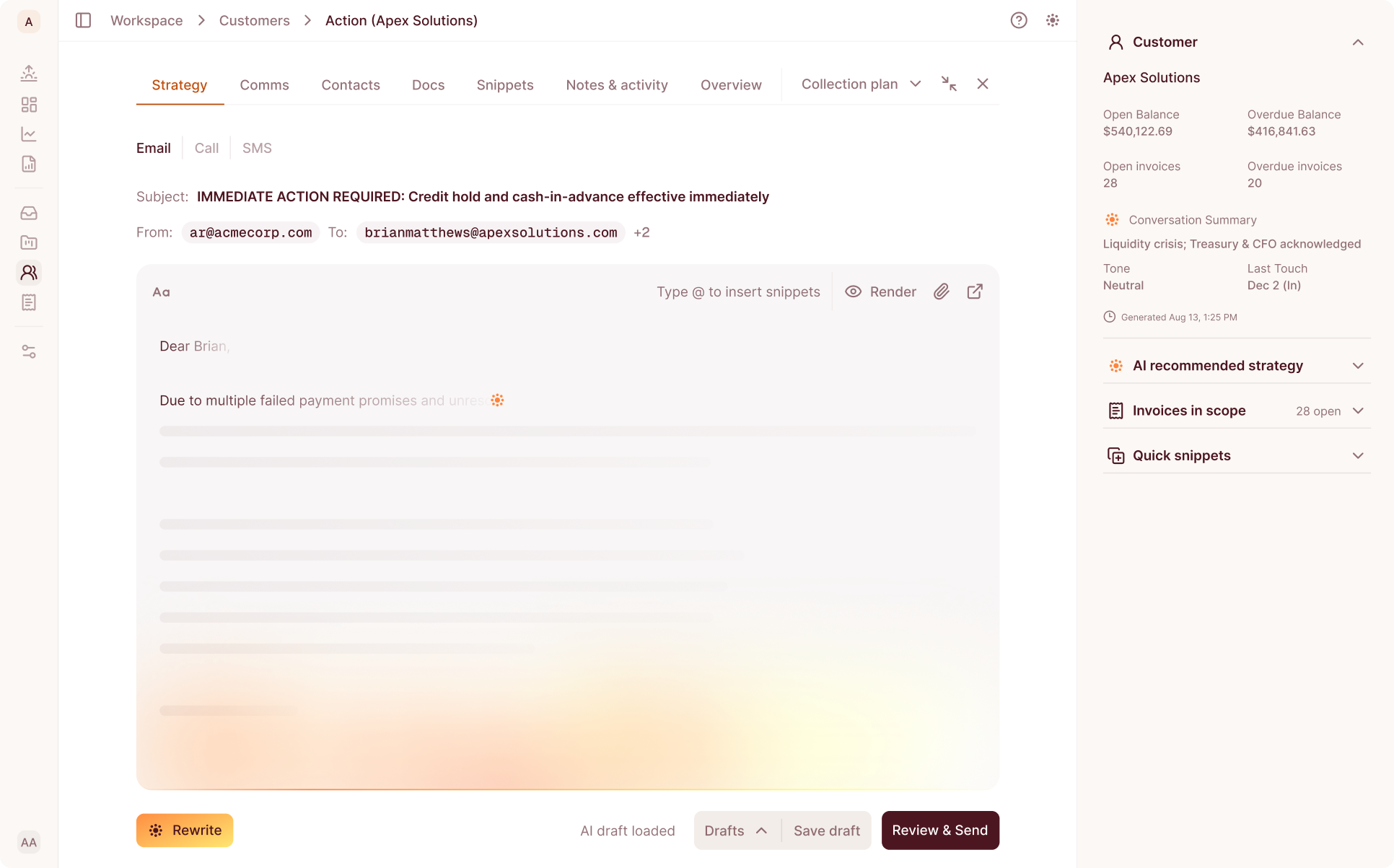
Here's what's actually built today. A collector starts the call — from a customer record, from a sequence step, or from the call queue — and Daylit's agent runs the conversation from there. It recognizes a voicemail greeting instead of talking into it. It routes a wrong-number pickup into a case instead of continuing the conversation with the wrong person. And when the call ends, the outcome is written back to the account automatically, so whoever looks at that customer next sees what actually happened — not just that a call took place.

None of this happens without a policy check first. Every outbound call is designed to run against one set of contact rules before it happens: consent, the contact's local calling hours, a cap of seven calls to one number in seven days, and a stop the moment someone opts out, disputes the balance, or is in bankruptcy.

What that adds up to, in practical terms: the afternoon a collector used to lose to voicemail greetings and repeated balance questions goes back to being an afternoon spent on the calls that actually need a person's judgment. The channel that was too expensive to run consistently stops being the one that gets skipped.

The Part That Stays Human: A Person Starts Every Call

Worth being exact about what "an agent runs the call" means, because it's easy to round it up into something bigger.

A person starts every outbound call. The agent doesn't decide who to call or when — a collector does that, the same way they always have. What the agent does is run the conversation once that call is placed: listening, responding, recognizing what kind of call it's turned into, and logging the outcome. There's no unsupervised auto-dial today, anywhere, for any account. That capability is explicitly gated behind measuring how accurate the agent is on a given company's calls first — and that measurement hasn't happened yet for any customer.

This isn't a temporary limitation waiting on a toggle. It's how the feature is designed to roll out: prove the conversation quality account by account, in review mode, before any account gets to skip the human-initiated step. If you're evaluating this for your team, the honest framing is: the agent conducts the call. Your collector still decides which calls happen.

How AI Calls Work in Daylit, End to End

Start from a customer record, a ready sequence step, or the call queue in the drawer. Press start. From there, the agent takes the conversation: greeting the person who picks up, working through whatever the call is actually about, recognizing a voicemail and leaving the right message instead of talking past it, and routing a wrong number into a case instead of pushing forward with the wrong contact.

Every one of those calls is designed to clear the same eligibility check before it dials — the contact's consent status, their local calling window, how many times they've already been called this week, and whether anything on the account (a dispute, an opt-out, a bankruptcy filing) should stop the call before it starts. If a call doesn't clear that check, it doesn't happen, and the reason is visible rather than silent.

When the call ends, the outcome writes back to the account. The next person who opens that customer record sees exactly what happened — not a blank space where a call used to be a mystery.

If your team is spending real hours a week on calls that mostly repeat the same handful of questions — balance confirmations, "can you resend that invoice," basic promise-to-pay conversations — this is built for exactly that layer of the work.

See it against your own queue

If the accounts that need this call are already sitting in your queue, book a demo and we’ll run it against your own list.

Book a demo

What Actually Changes

The phone didn't stop working. Staffing it did. Daylit's agent picks up the part that used to eat the afternoon — it handles the voicemail, routes the wrong number, and writes the outcome back to the account, so the call happens even on the days nobody had the hour to make it.

Have a question about how this fits your setup specifically? Ask us directly — we'd rather talk it through than have you guess.

Frequently Asked Questions

Does the AI call our customers on its own?

No. A person starts every outbound call from a customer record, a sequence step, or the call queue. The agent runs the conversation once that call is placed — it doesn't decide who to call or when. Unsupervised auto-dial isn't available for any account today.

Will the call come from our company's phone number?

Not yet. Numbers used for this feature are newly provisioned rather than ported from your existing line. Per-company caller ID is live, so calls will consistently show the same number for your account — just not your existing one.

What happens if the call goes to voicemail or hits a wrong number?

The agent recognizes a voicemail greeting and responds appropriately instead of talking into it, and a wrong-number pickup gets routed into a case rather than continuing the conversation. Either way, the outcome is written back to the account so your team can see what actually happened.

Is everything the agent says on a call checked for accuracy?

The agent works from a real, current snapshot of the account when the call starts. What isn't built yet is a check on the agent's own arithmetic or invoice selection once the conversation is underway — so treat any specific figure stated mid-call as something worth a second look until that verification layer ships.

Does this work alongside text messaging too?

Not today. This feature covers voice calls only.

Insights

You might also like...

Daylit vs. Billtrust: AR Automation Compared for Mid-Market Teams
Billtrust publishes a go-live number for one module and nothing for the rest of the platform. Here's the full comparison, including where Billtrust actually has the edge.
Read more
Daylit vs. Billtrust: AR Automation Compared for Mid-Market Teams
Report
Your Dispute Categories Aren’t Broken. They’re Not Yours.
Every dispute lands in the same generic bucket today, no matter what it's actually about. Here's how Dispute Reasons routes each one by your own categories, automatically.
Read more
Your Dispute Categories Aren’t Broken. They’re Not Yours.
Accounts Receivable Automation
Daylit vs. HighRadius: AR Automation Compared for Mid-Market Teams
HighRadius runs on a decade of enterprise history. Daylit runs on days, not quarters. A row-by-row look at where each one actually holds up, sourced from each company's own published materials, with Gartner, IDC, and Forrester validation cited where HighRadius provides it.
Read more
Daylit vs. HighRadius: AR Automation Compared for Mid-Market Teams
Report
No items found.